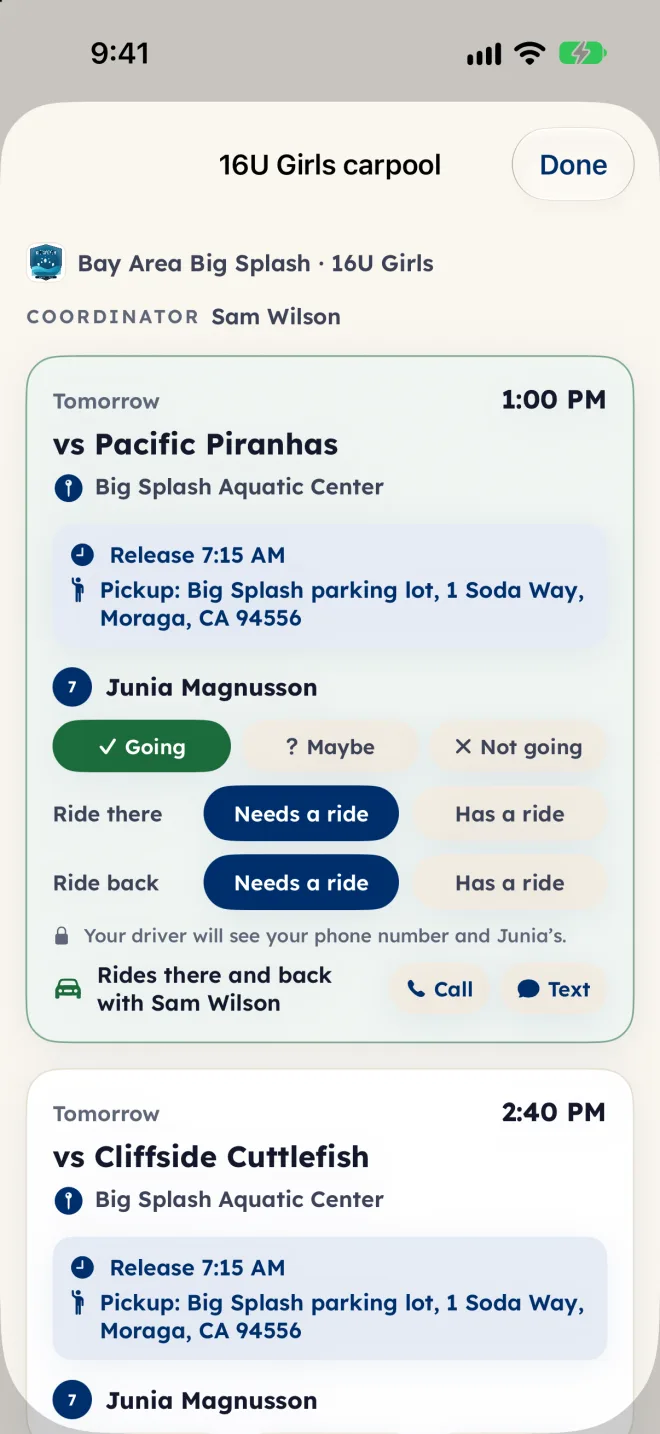
Each team can run one carpool, for its games (not practices). A coordinator runs it: a parent or guardian the club picked. Families say whether their player needs a ride, the drivers the coordinator cleared offer seats, and the coordinator builds the cars and sends them out. Families and drivers see who rides with whom only once the coordinator approves the cars.
Open it
- On iPhone and iPad, open the Family tab and tap the Carpool door. On Android and the web, tap your initials at the top of the screen, then the Carpool door.
- Or tap the Ride row in This week. It shows when the next event is a game and the team runs a carpool, and opens the carpool.
- The carpool lists the team's games for the next 30 days. When the team has no carpool, the door is dimmed and says so.
Ask for a ride
- Find the game and your player, and answer whether they are going: Going, Maybe or Not going (Can't go on Android and the web).
- Once your player is going, answer Ride there and Ride back separately: Needs a ride or Has a ride. Your driver will see your phone number and your player's.
- Until the cars are approved you see: The coordinator hasn't approved the cars yet.
- Once they are, you see who drives, for example Rides there and back with and the driver's name, with Call and Text. No seat yet? It says so: the coordinator is working on it.
- To change an answer, tap it again to clear it. Answers close when the game starts.
Drive
- The coordinator clears a parent or guardian to drive, and you get a notification.
- Under Your car, set Seats for other players (your own kids ride with you and don't count) and the Phone for riders' families, then tap Save.
- On each game, under Can you drive?, tap There, Back or both. Tap one again to take the offer back; if the cars were already approved, the coordinator is told.
- Once the cars are approved, you see Your riders there and Your riders back, each with Call and Text, where and when to pick up, and Directions.
The coordinator
- A club admin turns the carpool on for a team in the admin (Teams & families, then the team's Carpool card) and picks up to 4 coordinators. A coordinator is a parent or guardian on any of the club's teams, so they can run a team they are not on. That carpool shows under the doors (on Android and the web, under Carpools you coordinate).
- The coordinator sets the Usual release time (when the players leave school on a game day), the Pickup place, who is cleared in Drivers, and keeps the Phone list.
- For each game, the coordinator can turn Carpool for this game off (for a home game), set its own release time, Build the cars, move a player with Move to… and tap Approve and notify. Families and drivers see only the cars the coordinator approved.
- The board flags things to look at, such as Alone with an unrelated adult or More riders than seats. They are for the coordinator to check, and do not block approval.
Notifications
- Families: when their player's seat is set or changes, the hour before pickup, and reminders 3 days before, 1 day before and the morning of the game if they have not answered.
- Drivers: when they are cleared, when their riders change, the hour before pickup, and reminders 3 days and 1 day before if they have not said whether they can drive.
- Coordinators: when they are picked, and when a driver drops a ride that was already approved.
- Everyone in the approved cars: when the game is taken out of the carpool, or the release time, pickup place, game time or pool changes.
- Reminders never arrive between 9 PM and 7 AM. Without the app's notifications, a notice comes by email.
Who sees what
- Who is in: parents and guardians a coach approved, players on the team, and the coordinators. Fans are not, and neither is a family still waiting for the coach or on a team it claimed.
- Your driver sees your phone number and your player's, for the ride you asked for, through game day.
- You see your driver's name and carpool phone once the cars are approved, not the other riders.
- The coordinators see every family's phone numbers and answers, for carpool changes only.
- No home addresses: the only places are the pickup place and the pool.
Clearing a driver is the coordinator's call, by your school's or club's driver rules. Eggbeater records who cleared a driver and when; it does not check licenses or insurance.
Carpool is included on every club and team plan. It is not part of league or Tournament Host plans. On Android, if your app does not show the Carpool door yet, open app.eggbeater.app in your browser and sign in with the same account.