No spreadsheets, no group texts. Set up your club, score live from the deck, and share one link with every spectator. Usually the same day.
About 10 minutes to set up
Live in about 5 seconds
One link to share
Step 01
Set up your club
About 10 minutes: create your club code, add your crest and logo, invite your admins. Your club is live the moment you save. No onboarding call.
Step 02
Score live
A volunteer at the desk opens the scorer, picks a language, and taps the action, then the player. Every goal, exclusion and save reaches spectators in about five seconds.
Step 03
Share with spectators
Hand out one short code. Spectators open a page with your name and logo on any phone: live scores, the schedule, brackets and box scores. No login, nothing to install.
By role
What each person does on game day.
Spectator, scorer, director. Three jobs, one platform.
For spectators
Follow your player from anywhere.
No account needed to follow. Install the app and add alerts, widgets and the score on your lock screen.
Open the linkTap the share code. Live scores load at once, with the club’s name and crest.
Pick your playerMy Player keeps their goals, assists, steals and saves, game by game.
Turn on alertsAn alert for every score, and the game on your lock screen.
The live game card in the app: the score, the pool with map links, and the next game below.
For volunteers at the game desk
A real scorer’s table, on the desk you already have.
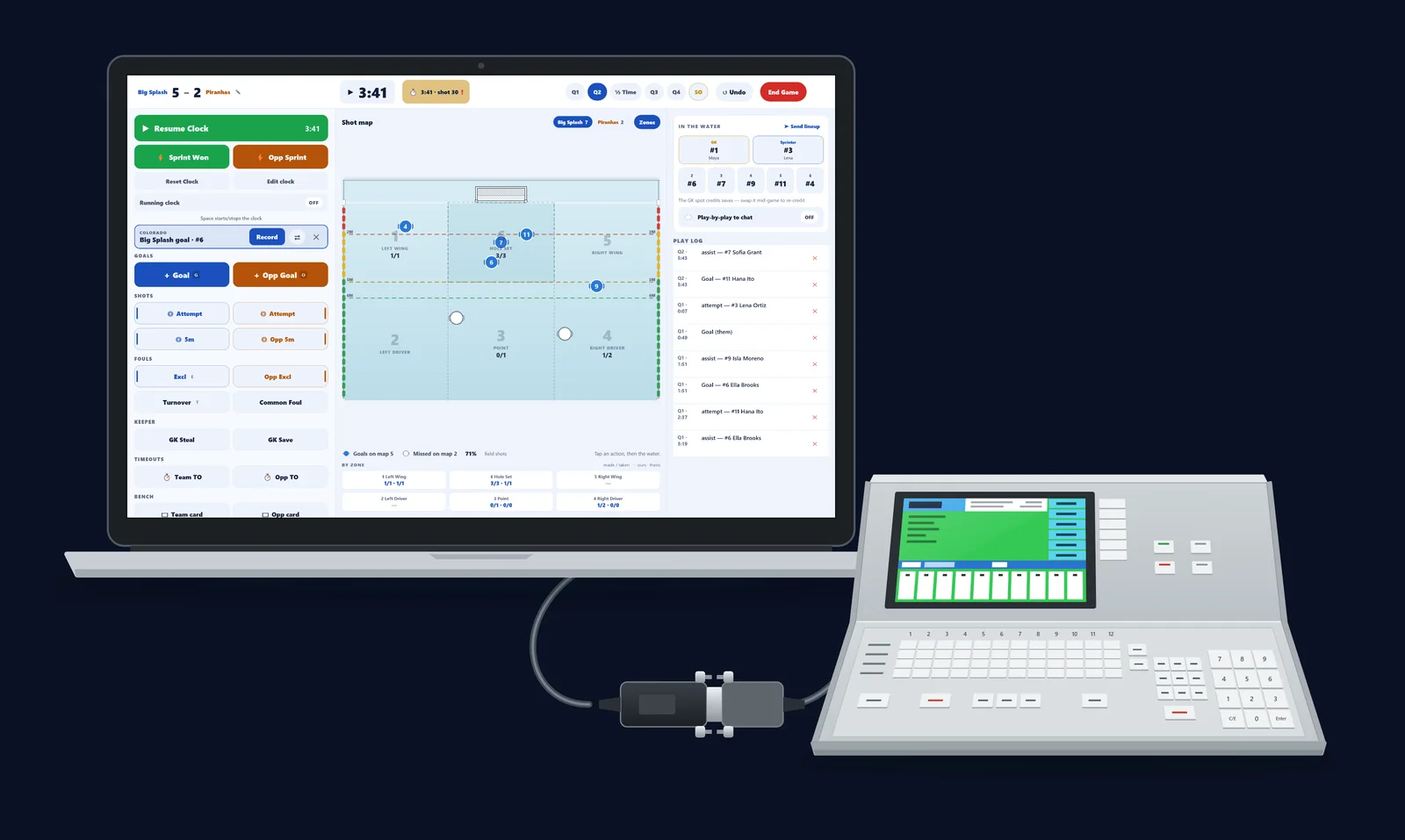
Eggbeater Desk is a scoring console for iPad, Mac, Android tablets and Windows. One screen, no scrolling mid-game. The space bar starts the clock, G and O score the goals, and every shortcut is printed on the button it drives. The phone scorer is still there when the Desk is not.
Keys, not huntingSpace starts and stops the clock. G and O put the goals up. Your eyes stay on the water.
Tap the action, then the waterA full-size shot map records where the shot came from and where the ball went.
Rules handled for youThree exclusions enforced, desk duties for high school games, and an optional referee sign-off.
Reads the Colorado consolePlug the Desk into a Colorado Time Systems System 6 console: the clock, the period, the shot clock and the cap numbers come straight off the board.
Publish your bracket or league, share one code, and follow every game from the host dashboard: spectator counts, players near the exclusion limit and schedule conflicts.
Build and publishThe bracket wizard, or the League Builder from a Google Sheet. Publish in a click.
Follow liveEvery team in the event on one screen, not only your own club’s games.
Sync and archiveScores write back to Sheets. Freeze the standings and start next year’s code.
admin.eggbeater.app
The host dashboard: games, finals, visiting clubs and the live game console.
Ready to run a better game day?
Set up your club, invite your teams and share one link. It takes about ten minutes.
About 10 minutes. Create your club code, set your crest and logo, and invite admins. There is no required onboarding call. You can run a real game the same day.
Do volunteers need training to score?+
No. Tap an action, then a player. Both rosters are already loaded, and there is a printable reference card in English, French and Spanish. Most walk-in volunteers are scoring with confidence within a game.
Do spectators need to download anything?+
No. The public page works in any browser with no login. Spectators who want alerts, the score on the lock screen and widgets can install the iPhone or Android app.
Can I follow on the big screen?+
Yes. The Apple TV app comes with the same App Store listing, at no extra cost. It shows live scores, the bracket, standings, the schedule and rosters. Load a tournament with its 6-character TV code, or pair your iPhone and send your team to the TV.
Can I import an existing schedule or roster?+
Yes. Bracket sheets and league schedules import from a Google Sheets link, and the workbook stays in sync as scores go final.