
Skip to content

Tournament planning guide

How to run a water polo tournament.

Everything you need to plan, schedule, bracket and manage a water polo tournament, from 6 teams to 60. Format, master schedule, bracket construction, live scoring and spectator communication, start to finish.

  • Format and pool sizing
  • Master schedule
  • Live scoring
  • Game-day checklist
How to host a water polo tournament with Eggbeater ·

More tournament videos

  • Water polo tournament day: QR codes, scorers and the TV board ·

All Eggbeater videos

Choose a format

The format you pick shapes everything downstream: how many pool slots you need, how many referees, and how long the day runs. These are the three most common formats for youth and club water polo tournaments.

Pool play plus a single-elimination bracket

Teams are divided into pools of 3 to 5, play a round-robin within their pool, then the top finishers advance to a single-elimination championship bracket. This is the most popular format because every team is guaranteed multiple games and the bracket keeps the final rounds exciting.

Double elimination

Every team must lose twice before it is eliminated. Better for smaller events (8 to 10 teams) where you want maximum game time per team. It doubles your scheduling complexity and your pool and lane requirements.

Pure round-robin

Every team plays every other team. Best for skill-level invitationals or events where winning matters less than game volume. It becomes unwieldy above 8 teams per pool.

Picking pool sizes

For most youth tournaments, 4-team pools feeding a 4-team bracket is the sweet spot. Two pools of four gives you three pool games per team and three bracket games at most: a full competition day without schedule bloat. Recommended pool setups:

TeamsPoolsGames per team
6 teams2 pools of 32 pool games, up to 2 bracket games
8 teams2 pools of 43 pool games, up to 3 bracket games
12 teams3 pools of 43 pool games, up to 3 bracket games
16 teams4 pools of 43 pool games, up to 3 bracket games
20 teams4 pools of 5 or 5 pools of 44 pool games, up to 4 bracket games

Age-group divisions

Most age groups (12U, 14U, 16U, 18U) run as separate divisions with their own pools and brackets. If you have too few teams in an age group to fill pools, combine adjacent age groups or create a “combined 14U/16U” division instead of running lopsided pools. Never force a 2-team “pool”. Schedule those two teams as a head-to-head with extra exhibition games.
Build the schedule

Your master schedule is the backbone of the tournament. Every downstream decision (referee assignments, pool bookings, team travel plans) depends on getting this right.

Calculate slot length

Start with your game duration and work outward. Each slot has to cover warm-up, the game itself, and clearing the pool. By age group:

Age groupPeriodsEstimated gameRecommended slot
12U and under5 to 6 min30 to 35 min45 min
14U6 to 7 min35 to 40 min50 min
16U7 min40 to 44 min55 min
18U / Senior8 min44 to 50 min60 min
Common mistake: cutting slot lengths too tight is the single most common scheduling error. A single overtime game or delayed start cascades into every later game in that pool. Build at least one 10-minute buffer per pool per half-day.

Assign divisions to pools and lanes

If you have multiple physical pools or lanes, assign each age-group division to a dedicated pool or lane where possible. Mixing age groups across the same pool leads to confusion about whose warm-up time it is and who is responsible for the scoreboard.

Handle bye rounds

When a pool has an odd number of teams, one team has a bye each round. Schedule byes early in the day so teams have time to warm up properly before their afternoon games. Never put a bye immediately before the bracket. Teams need game time in their legs.

Schedule rest gaps

A minimum 20-minute rest between games for players is the commonly recommended standard. Build this into your schedule by default. For older athletes, 15 minutes is workable. Flag any schedule that gives a team back-to-back games with under 20 minutes between them. It is a player-safety issue.

Export and share early

Publish the schedule at least 7 days before the tournament so coaches and spectators can arrange travel. Include the pool or lane assignment, the game time, and each team’s name for every game. A PDF is fine for email. A live schedule app is far better because you can post changes instantly.

Set up the bracket

Once pool play wraps, you need to seed your bracket quickly and accurately. Delays here kill momentum and frustrate coaches who need to plan their travel.

Pool-play tiebreakers (in order)

The standard order, so seeding is fair and transparent:

  1. Win/loss record. Most wins advances.
  2. Head-to-head result. If two teams are tied, did they play each other? The winner of that game advances.
  3. Goal differential (capped). Cap goal differential per game at ±6 so blowout scores do not skew the seeding (for example, 12-1 counts the same as a 7-1 win).
  4. Goals scored. Total goals across all pool games.
  5. Coin flip or draw. If still tied after all of the above.
Publish your tiebreaker rules in the team packet before the tournament. Coaches who understand the rules in advance play differently, and you avoid disputes poolside when the stakes are high.

Cross-seeding your bracket

The standard bracket seeds so Pool A’s first-place team plays Pool B’s second-place team, and vice versa. This accomplishes two things: it keeps the top seeds in opposite halves so they only meet in the final, and it prevents immediate rematches from pool play in the opening bracket round. For a 4-pool event, a standard seeding is 1A vs 2B, 1B vs 2A, 1C vs 2D, 1D vs 2C, with bracket winners advancing toward the championship.

Consolation bracket

Always run a consolation bracket for teams that lose in the first round. Teams have traveled for the weekend and deserve more than two games. A 3rd/4th-place game and a consolation bracket give every team a meaningful final or placement game.

Run live scoring

Live scoring is the single biggest difference between a tournament that feels live and one where spectators learn the score from a group chat. When spectators and coaches can follow every pool in real time, it changes the energy of the whole event.

What to track

At minimum, capture the score for every game. The real value is stats for each player. If your scorers are capable, add:

  • Goals scored (player number or name)
  • Exclusions (5-meter and major)
  • Timeouts used per team
  • Shots on goal (for coaches who want post-game stats)

Scorer setup

Assign one dedicated scorer per pool. They do not play, coach, or spectate. Their only job is the scoreboard. Give them the game schedule, both rosters, and a scoring device before the first game. Brief them on the Eggbeater scorer so they can flag a situation in a game that may need review.

Eggbeater’s scorer view fits on a single phone screen. It shows both teams, the current score, the period, and a tap-to-score interface that requires no setup. Scorers can be up and running in under 2 minutes.

Score visibility

Scores should flow to spectators automatically. Do not rely on someone posting updates to a group chat. That stops as soon as things get busy. A live-scoring platform that pushes updates to a public page means spectators see scores without anyone refreshing or posting.

Comms and operations

Communication breakdowns (wrong game times, pool changes, delayed bracket updates) cause more tournament complaints than anything else. Here is a communication timeline that works.

Communicate with teams and spectators

Send four touchpoints, each with a clear purpose:

  • Full schedule and team packet. Publish the master schedule, pool assignments, tiebreaker rules, venue map, parking info and check-in location. Send it to all head coaches.
  • Reminder and logistics update. Confirm start times, remind coaches of warm-up windows, and share any last-minute changes. Include a link to the live schedule for day-of updates.
  • Day-of check-in instructions. Remind coaches where to check in, confirm the first-game time, and confirm referee assignments. Post bracket draws as soon as pool play ends.
  • Live scores and bracket updates. Push notifications for every period and final score. Bracket redraws go live the moment pool play standings are confirmed, so spectators do not have to ask.
Separate channels for coaches and spectators: coaches need operational detail such as roster eligibility, referee conduct and protest procedures. Spectators need game times, scores and directions. Mixing everything into one shared channel means spectators get overwhelmed and coaches miss critical updates.

Game-day operations checklist

Even a well-planned tournament can fall apart on the day if operations are not tight. Walk through this list the morning of your event:

  • Before the first game. Confirm all referees have arrived and have their game assignments. Verify scorers are at their pools and have scoring devices charged. Confirm pool and lane assignments are posted visibly at the venue. Set up the results board (physical or digital) near the main entrance. Have a printed backup schedule for every pool scorer in case of device issues. Designate one person as the “schedule authority”: all delay and change decisions flow through them.
  • During pool play. Monitor all pools for schedule drift every 90 minutes. If a pool runs 10 or more minutes behind, assess whether to shorten the next two warm-up windows. Log final scores centrally as each pool wraps. Do not wait for scorers to deliver scoresheets at the break. Start computing standings during the final round of pool play so bracket seeding is ready instantly.
  • Between pool play and brackets. Confirm final standings with your designated authority before publishing. Post the bracket at all pool areas simultaneously. Announce pool and lane assignments for each bracket game before teams leave the venue. Give coaches a 10-minute heads-up before each bracket game starts.
  • Handling common problems: forfeit. If a team cannot field 7 players at game time, standard practice is a 5-minute grace period, then a forfeit recorded as 5-0. Decide your policy in advance and publish it.
  • Handling common problems: ejection. Any player ejected for a major foul sits for the remainder of the game under most rulebooks. Track ejections in your scoring system so they do not accidentally play in the next game if officials change.
  • Handling common problems: pool closure. If a lane goes out of service in the middle of the tournament, pair the affected games with available lanes and push an immediate schedule update. This is where live schedule platforms beat a static PDF: one edit updates every phone.

Software

Running a tournament with spreadsheets and group texts works, until it does not. Once you exceed 12 teams or run multiple age groups simultaneously, the coordination overhead overwhelms volunteer staff. Purpose-built software handles the repetitive parts so your staff can focus on the edge cases.

Tournament management software

Here is what to look for in tournament management software for water polo:

  • Schedule import. You should be able to import from a Google Sheet or spreadsheet instead of entering every team’s games again by hand.
  • Multi-division support. 12U, 14U, 16U and 18U should each have their own brackets and standings running simultaneously.
  • Live scoring from the pool deck. Scorers need a simple mobile interface, not a full admin panel.
  • Push notifications. Spectators should receive score updates automatically, not because someone remembered to post.
  • Spectator access with no app install required. Many spectators will not install a dedicated app for a single weekend tournament. A web interface is essential.
Built for water polo: Eggbeater covers all of the above. Import your schedule from a Google Sheet, run live scoring from the pool deck, publish brackets with one tap, and let spectators follow on iOS, Android, or any browser, completely free for spectators.

One platform, tournaments and leagues

Director mode in Eggbeater is designed specifically for multi-pool tournament hosts. You can manage four age groups across four pools from a single dashboard, with each pool’s scorer working independently in real time. Standings, brackets and push notifications all update automatically as scores come in. The same platform also runs multi-week leagues from the Leagues tab.

The Colorado console

The console runs the clock. Your scorer runs everything else, from one screen.

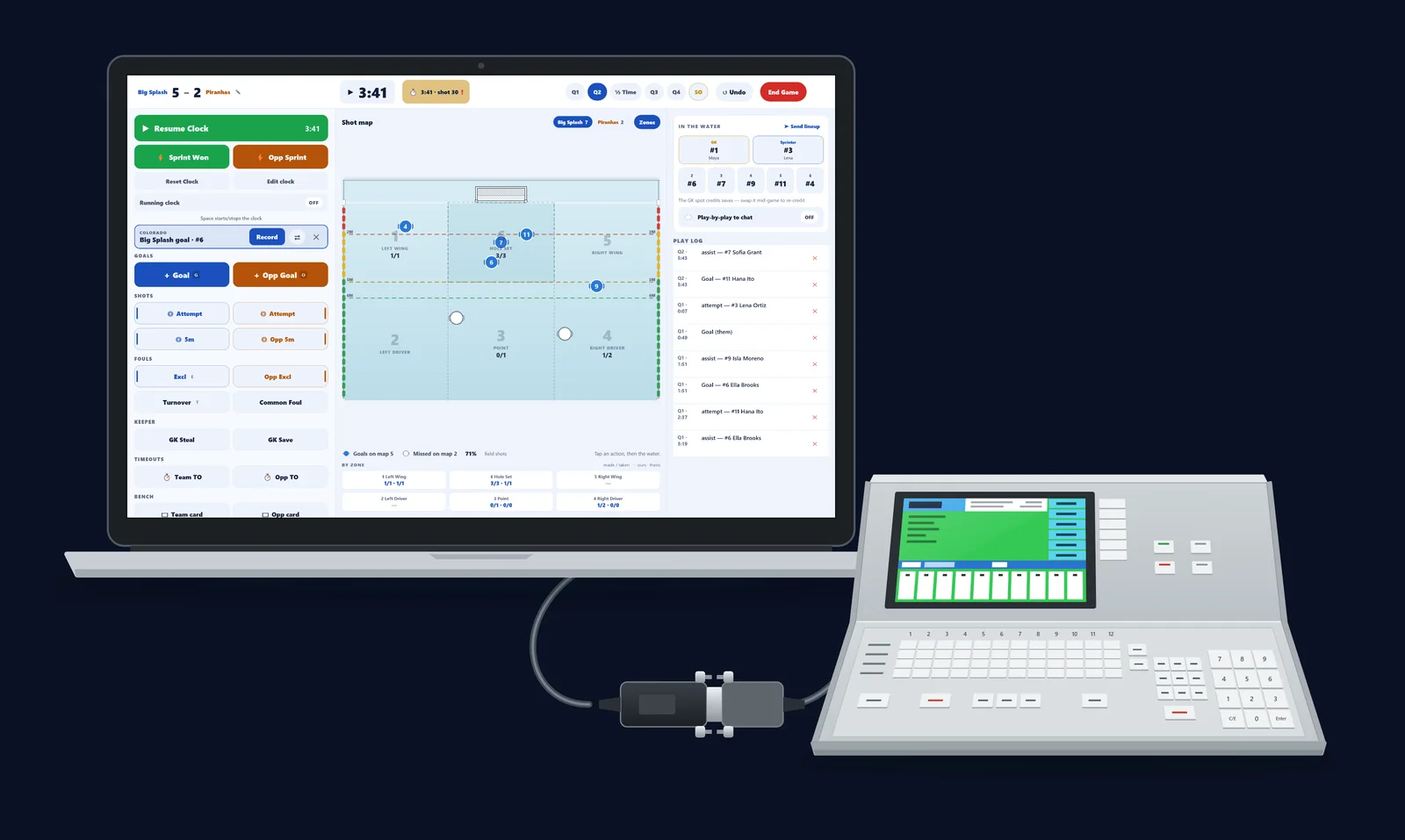
Eggbeater Desk works with Colorado Time Systems System 6 consoles. The console already sends its digits to the pool’s scoreboard through its Scoreboard jack, and the Desk reads the same signal. Once it is connected, the game clock, the period, the breaks and the shot clock follow the console, and every goal and exclusion the table enters shows up on the Desk with the cap number, one tap from the record.

Console reading runs on a Windows PC or a Mac with the cable in step 1, or on an iPad with the Eggbeater console bridge (see below). Android tablets run the Desk without the console. Update the Desk before game day.

A laptop running Eggbeater Desk mid-game, a System 6 timing console, and a USB serial adapter hanging between them on its cables.
The kit, plugged in: a System 6 console, a USB serial adapter and Eggbeater Desk on a laptop. Illustration; the Desk on screen is the real app, with sample teams.

What the console takes over

The console keeps the time.

  • There is no clock to run. The game clock, the period, start and stop, and the shot clock all follow the console.
  • Quarter breaks and half time. The quarter holds at 0:00 and the break counts down beside the clock. Spectators see the same countdown.
  • Goals and exclusions arrive as prompts. When the table enters a goal or an exclusion on the console, it appears on the Desk as a COLORADO prompt with the cap.

You keep the game.

  • You still tap shots, saves, turnovers, timeouts and cards on the Desk, the same as always.
  • Record fills in the player and opens the rest (shot type, assist, where it went in, where it came from), and you can skip any step. The dismiss button clears it. No cap on the board? The prompt says “which cap?”, and Record asks you who it was.
  • Each prompt carries three buttons: Record, swap and dismiss. Nothing counts twice. Nothing is ever recorded by itself. Every prompt waits for your tap.
  • Who’s in the water. The goalkeeper and sprinter slots, and the rest of the seven in the water.
  • End the game. Click End Game, add both referees’ names if your host requires them, and End game publishes the final. Resetting the console never moves the finished game.

The setup guide takes you from the parts to the final horn. Read the setup guide. Open the Desk guide.

Colorado Time Systems and System 6 are trademarks of their owner. Eggbeater is not affiliated with or endorsed by Colorado Time Systems.

Run your next tournament on Eggbeater.

Free to start. Import your schedule, publish live brackets, and keep spectators updated automatically. No spreadsheets required.

Questions

Frequently asked questions

How many teams do you need to run a water polo tournament?

As few as 6 (two pools of 3) makes a viable tournament with a real bracket. The sweet spot for youth and club events is 8 to 16 teams across two to four pools of four: enough for three guaranteed pool games per team plus a bracket, in a single competition day.

What is the standard water polo tournament format?

Pool play (round-robin within small pools) feeding a single-elimination championship bracket, with a consolation bracket for first-round losers. It guarantees every team multiple games while keeping the final rounds exciting.

How long should I allow between water polo games?

A minimum 20-minute rest between games for players is the commonly recommended standard (15 is workable for older athletes). Build at least one 10-minute buffer per pool per half-day so a single overrun does not cascade.

How do you build a water polo bracket?

Seed teams from pool play using win/loss record, then head-to-head, then capped goal differential, then goals scored. Cross-seed so the top two seeds land in opposite halves (1A vs 2B, 1B vs 2A and so on), and always run a consolation bracket so every team gets a meaningful placement game.

What software helps run a water polo tournament?

Look for schedule import from a Google Sheet, multi-division support, live scoring from the pool deck, automatic push notifications, and spectator access with no app install required. Eggbeater is built for exactly this. Director mode handles tournaments from start to finish.

Do spectators need to install an app to follow the tournament?

No. With Eggbeater, the public tournament page works in any browser, with no login and no install. Scores refresh every 5 seconds and box scores for every player are visible to everyone with the link.