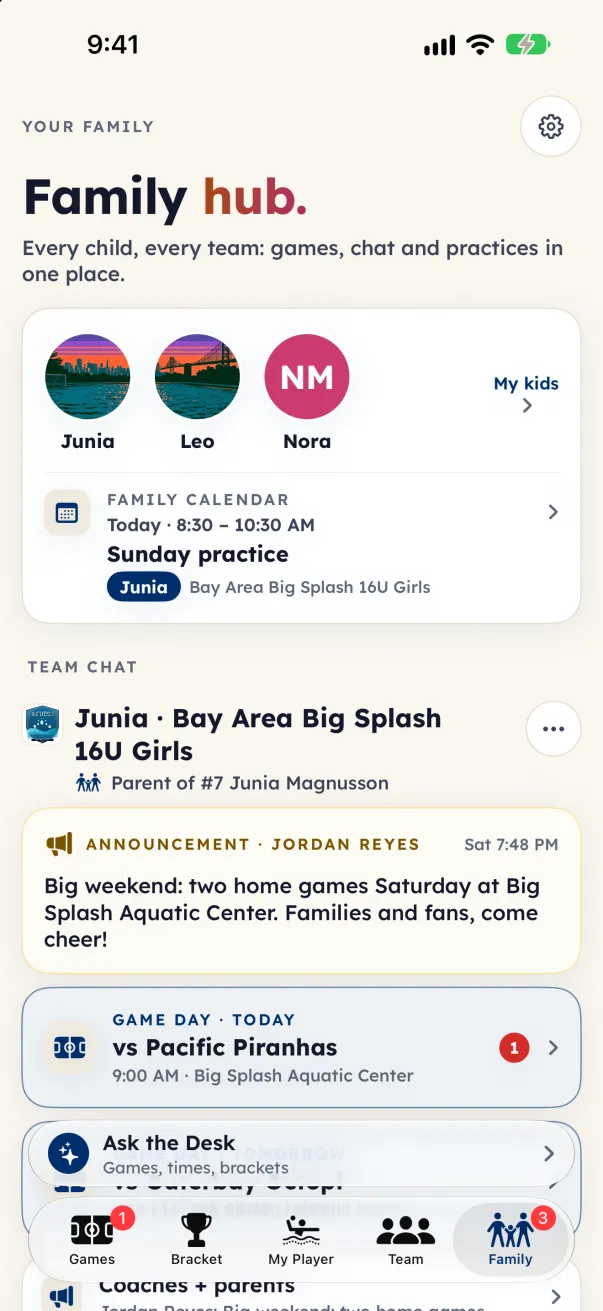
On iPhone and iPad, open the Family tab (it took the place of the old chat tab). On Android and the web, tap your initials at the top of the screen; it says Sign in when you are signed out.
What's in it
- Your kids: each child's photo or initials, and My kids to manage them. With Premium, a parent or guardian linked to the child can add a photo.
- Family calendar: the next game or practice for any of your kids. Tap it for the whole calendar and a reply for each child.
- Team chat: one card for each team that uses Eggbeater's team tools, with Coaches + parents, Team chat, the parent section and game-day threads.
- Waiting for the coach: teams where a coach still has to approve you.
- Not on team tools yet: teams you claimed before they used team tools, each with its Families chat and an Invite the coach button.
- Teams you follow: the teams you follow as a fan, with their Team updates.
The Families chat
- A chat for the parents and guardians who claimed kids on a team that does not use team tools yet. Parents only. Players never join.
- The club admin can read and moderate it, like every Eggbeater chat.
- When the team turns on team tools, it closes and moves to Waiting for the coach: Closed when the team turned on team tools. You can still read it. Team chat takes over once the coach approves you.
Invite the coach
- Under Not on team tools yet, tap Invite the coach.
- Send the note by text or email. It tells the coach that team tools add team chat, practice times and replies, and links to the club directory. On the web, if your browser cannot share, the note is copied: paste it into a message.
At the bottom of the hub, Add a child adds another child or another team, and Join another team (on Android and the web, Join your team until you are on one) joins with a team code. On Android and the web, Follow a team as a fan is there too.