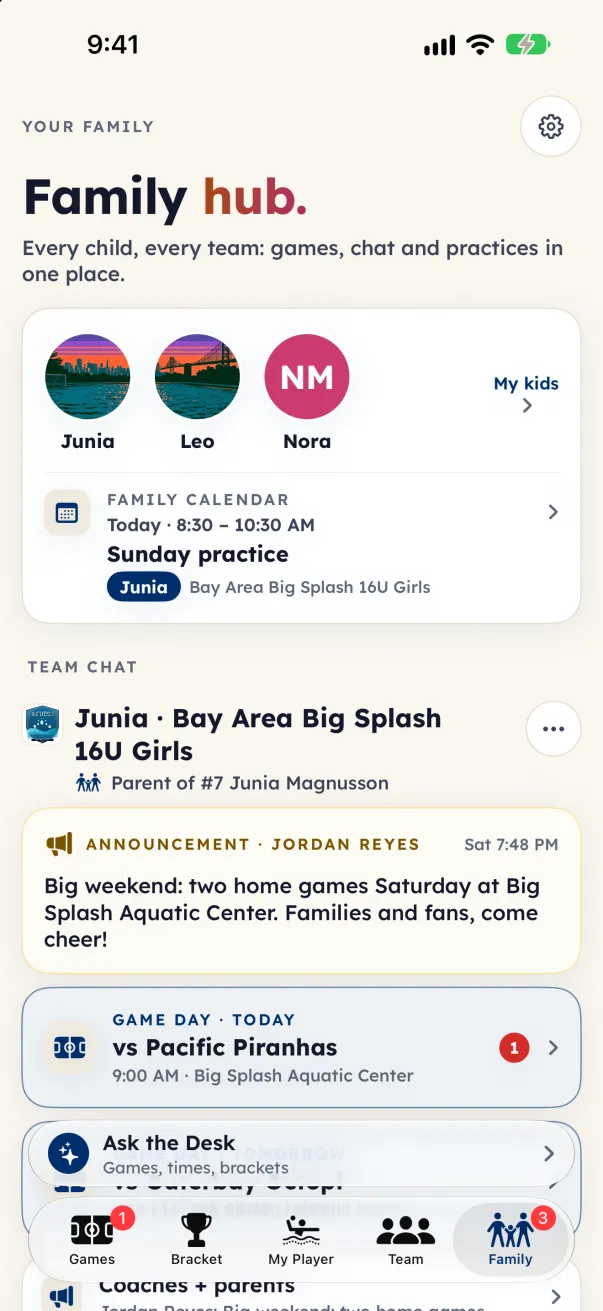
Chat lives in your family hub, under Team chat, grouped by child and team. On iPhone and iPad that is the Family tab; the Team tab's You on this team card also lists the team's conversations, and each game card has a Game-day chat link. On Android and the web, tap your initials at the top of the screen.
The conversations
- Coaches + parents: the coaches and every parent or guardian on the team. Announcements live here. Players are not in it.
- Team chat: the coaches, the players a parent or guardian allowed, and one monitor parent the coach picked. It opens only once a monitor parent is picked, and there are no private messages.
- Parent section: topics started by parents and guardians, such as carpools, gear or hotels. Coaches are not in it. Tap Start a topic to begin one.
- Game day: a thread for each game, opened the day before and archived after the game.
- Families chat: only for a team you claimed that does not use team tools yet. See "Your family hub".
Press and hold a message (on Android and the web, tap it) to react, Reply, Copy, Edit your own message within 15 minutes, Delete it, or Report or Block someone else's.
The club admin can read every conversation and moderate it. Fans have no chat.